Why Your AI Forgets or Stops: Claude Artifact Token Limits Explained
Two different limits, and a slow loss of memory in long chats (long-chat drift), get blamed for the same symptom. Knowing which one you hit decides whether the fix is a fresh chat or a wait.
Quick answer
Everything in a Claude conversation counts towards the context window, including Claude's own replies, so any artifact (the file it writes for you) counts too. The main size limit is that window, which is how much one conversation can hold. Separately, the usage limit is how much you can use across all your chats over time. Long before the window fills, a crowded chat can also start forgetting early instructions. A full window and a forgetful chat are both fixed with a fresh chat and a handover summary; the usage limit is the odd one out, because a new chat won't help and you wait for it to reset.
Tools for this build
Custom Prompt Builder
Writes a tighter first prompt, so a fresh chat starts with the right context in fewer words.
Website Prompt Generator
Ready-made prompts for common website fixes, each ready to paste as the first message of a fresh chat.
POPIA Compliance Checker
Checks how the app you build handles customer data, worth doing before you paste real customer details into a chat as test material.
What a token is, in plain words
AI models don't read words. They read tokens: small chunks of text, often a whole short word or a piece of a longer one. Every limit on this page is counted in tokens, not words or messages. As a rough rule of thumb, symbols, tags and indents often become tokens of their own, so a screen of code can cost more than a screen of plain English. That's one reason a chat full of code fills up faster than it looks.
The context window: your AI's working memory for one chat
The context window is everything the AI can see while it writes its next reply: your messages, anything you pasted and every reply it has already given. Anthropic's own documentation calls it the model's working memory, separate from what it learned in training. It has a fixed size. When a chat outgrows it, something has to give.
Here's the part most beginners miss. The AI doesn't carry your chat around between messages. Each time you send something, the whole conversation so far goes back in, from the top, and the reply is written from that. A chat with 40 back-and-forths is read in full again on message 41.
Claude artifacts show this clearly. An artifact is the separate panel where Claude puts a file it writes for you, such as a web page or a script. It's still part of Claude's reply, so it counts towards the context window like any other message, and every change Claude writes into the chat adds to what's there. A long web page revised six times is a lot of text for the AI to carry, and it's read again on every new message. That's why an artifact-heavy build hits trouble sooner than a chat of plain questions.
How big is the window? It depends on the model, and it changes whenever new models ship, so check your provider's current documentation rather than a number on a blog page. What stays true: it's finite, and everything counts.
Why your AI forgets long before the chat is full
A long chat goes soft before it hits any hard limit. The more text sits in the context window, the worse the model gets at recalling any single piece of it. Anthropic's engineering team calls this context rot (the same slow loss of memory this page calls long-chat drift), and Anthropic's documentation also says more context isn't automatically better (both checked September 2026). You'll recognise it by these signs:
- It ignores a rule you set at the start ("don't touch the header").
- It brings back a bug it fixed an hour ago.
- It contradicts a decision you both agreed on earlier.
- It rewrites parts of the build you asked it to leave alone.
None of this means the AI is broken or that you prompted badly. Your early instructions are still in the window. They're competing with everything that came after them.
What happens when a chat does hit the wall
When a conversation fills its context window, you'll usually see one of two things. The chat stops: the reply trails off, or you get a message that the conversation is too long. Or the chat carries on, because the tool summarises or drops the oldest messages to make room. Some chat apps, Claude among them, summarise automatically once a chat gets long, on paid plans with code execution switched on in your settings, and Anthropic's developer documentation notes that chat apps can also drop the oldest messages first (both checked September 2026).
When the oldest messages are dropped, their detail is gone. When the chat is summarised, the AI works mostly from a condensed version of the early part, even though Anthropic says Claude still keeps the full history to refer back to. Both keep a long build going. Neither cures context rot, which is why a long build still drifts from what you first asked for. Automatic summarising also costs more: Anthropic's help centre notes that longer conversations that trigger this automatic summarising use more of your allowance.
One special case: if the very first message in a brand-new chat already fails, the most likely cause is that you pasted too much at once, such as a whole project's code or a huge error log. There's nothing earlier to summarise. Paste the part that matters.
The usage limit is a different thing entirely
The usage limit caps how much you can use the AI across all your conversations, not how long one conversation can be. Anthropic's help centre draws exactly this line between usage limits and length limits. If you hit the usage limit, a new chat won't help, because every chat draws from the same allowance. You wait for it to reset, or get more allowance on your account.
Some providers share one allowance across their web, desktop and coding apps (Anthropic does, for claude.ai, Claude Desktop and Claude Code), so a heavy session in one eats into the others. How much you get and how it resets depend on your plan and change often, so read the provider's own current usage page. Look for three things there: whether the limit resets on a rolling window or at a fixed time, whether it's shared across apps, and what happens when you run out.
The two limits are linked in one way. A longer chat uses more of your allowance with every message, because the whole conversation goes back in each time, and Anthropic lists conversation length among the things that drive usage. Starting fresh sooner saves both.
How to tell what went wrong
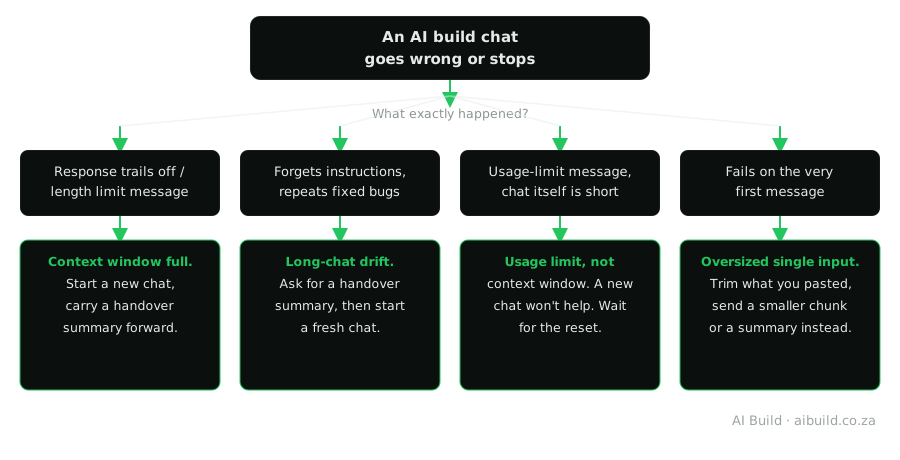
Work from what actually happened, not how it felt. A cut-off reply, a length message, a forgetful AI and a usage-limit message all feel like "it stopped working", yet each has its own cause and its own fix. Five quick checks, in this order, tell them apart:
- Read what actually happened. Note the exact message, if there is one, and what the AI did just before it.
- The reply trails off, or you see a length message: the context window is full. Start a new chat and carry a handover summary forward. If the old chat still replies, ask it for one first (the prompt is below).
- It forgets instructions or brings back fixed bugs: that's long-chat drift. Ask for a handover summary and start a fresh chat with it.
- You see a usage-limit message, even in a short chat: it's the usage limit. A new chat won't help. Wait for the reset, or check your plan on the provider's own page.
- The very first message of a new chat fails: most likely you pasted too much. Trim it to the part that matters and send that.
The flowchart below shows the same causes as the checks above, with the fix for each branch.
Which one did you actually hit?
What to tell your AI: the handover prompt
Two of the four causes in the flowchart have the same fix: move to a fresh chat without losing what you built. Don't retype the project from memory. Ask the AI to write the handover for you, ideally before things go wrong, then paste it as the first message of the new chat.
Before we continue, write a handover summary I can paste into a brand-new chat. Include:

1. What we're building, in two or three sentences.
2. What's finished and working.
3. What's still broken or unfinished.
4. Every rule and decision I've given you (tech choices, things not to change, style rules).
5. The main files and what each one does.
6. The exact next step.

Keep it short enough to read in one minute. Don't include full code; I'll paste any file you need.
What to check in its answer
- Every rule you remember setting is there. If one is missing, that's likely the one it had already lost. Add it yourself before you paste.
- The "still broken" list isn't empty on a build you know has problems. If it is empty, correct it.
- The next step matches what you actually want to do next.
- It's short. A handover as long as the chat defeats the point.
Then open the new chat, paste the summary, and paste only the file you're working on next.
Habits that keep a long build out of trouble
- One job per chat. When you move to a new feature, start fresh.
- Paste the part, not the whole project. The file or section under discussion is enough.
- Start fresh at a milestone, not when it breaks. Once a feature works, ask for the handover and move on while the AI still remembers everything.
- Keep a short project brief you paste at the start of every new chat. Our guide to giving your AI project context shows what goes in one.
What isn't possible
- You can't keep one chat sharp forever. Every window is finite, so a good handover summary is the best carry-over there is.
- A bigger window doesn't cure the forgetting. More room isn't better attention.
- A new chat doesn't reset a usage limit. Only time, or more allowance on your account, gets you going again.
If this didn't fix it
- The chat is fine, but the build has a real bug: describing a bug so your AI can fix it.
- New to the whole build loop: How to Build a Website Using AI, Step by Step.
- The site you built is broken, not the conversation: check the Errors & Troubleshooting hub.
Not affiliated with the platforms we write about
AI Build South Africa is an independent resource. We're not affiliated with, endorsed by or an official partner of Anthropic. Context window sizes and usage limits change as new models and plans ship, so confirm current figures in the provider's own documentation. See our Disclaimer for the full disclosure and our Terms of Service for the wider terms.
Frequently asked questions
Do Claude artifacts use tokens?
Yes. A file Claude writes for you is made of tokens like every other part of the chat. If a build feels heavy, start a fresh chat and paste in only the version you are working on.
Is there a size limit on a Claude artifact?
The room that matters is the whole chat's, not the file's, so if a long file cuts off partway, the chat is usually running out of room. Ask for the file in parts, split it into smaller files, or start a fresh chat with a handover summary. An artifact that saves data between sessions (such as a to-do app that remembers your entries) has its own separate storage limit for that saved data, which is a different thing from the length of the file. Check Anthropic's own documentation for the current figures for the context window and for saved data, since they change as new models ship.
Why does my AI keep forgetting my instructions?
Say the rule again where it matters: keep your key rules short, put them in the first message of every new chat, and repeat the one that keeps slipping in your next request. If it still slips, start fresh with a handover summary.
What's the difference between the context window and the usage limit?
Think of the context window as the size of your desk and the usage limit as the hours you're allowed to work in a period. A full desk is fixed by clearing it and starting again, while used-up hours only come back when your allowance resets or you get more. Hitting one doesn't mean you've hit the other.
How do I tell a usage-limit message from a length message?
Open a brand-new chat and send a short message. If the new chat works, the old conversation had simply grown too long, so carry a handover summary across. If the new chat shows the same message, it's the usage limit.
Is the limit different in South Africa?
Not as far as the Anthropic help pages we read say. They tie these limits to the model you use and the plan you're on, and none of them mentions your country.
Related reading
- When to Start a New Chat Instead of Continuing: the signs that a conversation has run its course, before any limit message appears.
- Breaking Vibe-Code Loops: when the same bug keeps coming back, and how to tell a loop from long-chat drift.
- Claude Code, Codex CLI & ChatGPT: Real vs Fake Slash Commands: the real commands, such as /compact for a long chat, and the made-up ones to ignore.
- Iterating on an AI-Built App Without Breaking Working Code: asking for changes in small steps, so each chat stays short and each change is easy to undo.
- Writing Prompts AI Coding Agents Actually Understand: a well-formed first prompt, so a new chat does not repeat the mistakes of the old one.