Breaking a Vibe-Code Loop: When AI Keeps Fixing the Same Bug
Bug A gets fixed, bug B appears. Fix B, and A comes back. The way out isn't a better prompt on the fourth try, it's your platform's own revert feature.
Quick answer
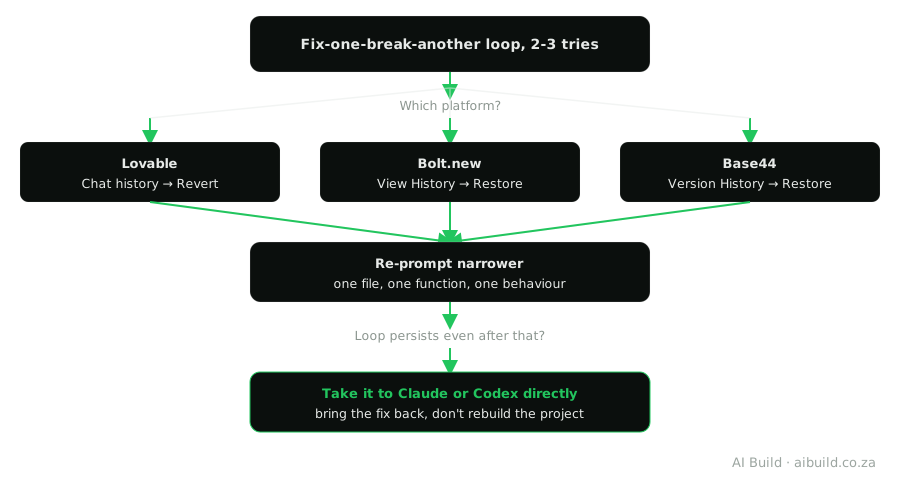
Two or three prompts that each fix one thing and break another is the signal to stop, not to try again the same way. Roll back to the last working state using your platform's own version history (Lovable's chat-history Revert, Bolt.new's Restore, Base44's Version History panel), not a manual patch on top of the broken state. Then re-prompt narrower: name the one specific file or function involved instead of repeating the broad request that caused the loop in the first place.
Tools for this build
Custom Prompt Builder
Writes a tighter, more specific prompt, the kind that actually breaks a loop.
Website Prompt Generator
Ready-made prompts for 10 common website fixes, each written to report first and stop after one failed attempt.
POPIA Compliance Checker
For when your build starts collecting real visitor data.
Why this happens in the first place
An AI coding agent fixing a bug is working from the code and error message in front of it, not from a durable memory of every attempt that came before. Fix bug A by changing a function, and that change can break something bug B depends on, something the agent didn't have visible reason to protect while focused on A. Ask it to fix B next, and the fix that undoes A's problem is often the most direct path back, since it's the version of that code the agent has already reasoned through once. Neither fix is wrong in isolation. The loop is a side effect of fixing one visible problem at a time without holding the whole picture, made worse the longer a single conversation runs and the more of its own context gets used up by the back-and-forth itself.
A concrete shape this often takes: a form validates an email field, but rejects a genuinely valid address, so you ask for a fix. The fix loosens the validation, and now an obviously invalid entry gets accepted, so you ask for that to be fixed. The second fix tightens the same regular expression back toward where it started, and the original valid address gets rejected again. Nothing here is a bug in the AI itself; it's a normal consequence of solving a two-sided constraint (reject bad input, accept good input) one side at a time, in a conversation that isn't holding both requirements in view at once.
This is a different problem from a Claude Artifacts context window filling up, covered in this site's own guide on Claude Artifact Token Limits, though a long looping conversation can genuinely make both worse at the same time: more failed attempts means more tokens spent, which brings a context-window limit closer just as the loop itself gets harder to escape.
The signal to stop is earlier than it feels
Two or three prompts on the same bug, each one fixing what you asked and breaking something else, is the actual signal, not five or six. It's tempting to keep going because each individual response looks like real progress, a specific bug got specifically fixed, but the pattern across attempts is what matters, not any single attempt. Set the limit before you start, not while you're in the middle of it: decide upfront that attempt three, if it doesn't resolve things cleanly, means reverting instead of prompting a fourth time.
Rolling back, platform by platform
All three platforms this site covers keep a real version history, not just an undo button for your last keystroke, and rolling back doesn't delete anything you built after the point you're returning to; it stays available and can be reapplied once the loop is resolved.
Lovable: open the chat history, scroll back to the message right before the loop started and click Revert on that version. This restores the code from that point without touching anything else in the conversation.
Bolt.new: use View History or scroll the chat itself, preview a version with the eye icon, then use the restore action once you've confirmed it's the version you want. Reverting to a checkpoint doesn't cost tokens, unlike sending another prompt that might not fix anything.
Base44: open Version History and restore the app's last stable generation state. This is separate from Base44's longer-range data version history for table records, which is tied to specific paid plans; the generation-state restore used here to escape a stuck build is the more immediately relevant feature for this exact problem.
From stuck loop to a working fix
Re-prompting after a revert: what actually breaks the cycle
The prompt that caused the loop was almost always broader than it needed to be, describing a feature or a page rather than the one specific thing that's actually wrong. After reverting, name the exact file or function involved if you can see it in the code, describe the specific behaviour you want instead of the bug you're seeing and leave out everything unrelated to that one problem. A prompt scoped this tightly gives the AI agent far less room to fix your one thing by breaking a different one, since there's less surrounding code in scope for the fix to touch.
When rolling back isn't enough
Some bugs are genuinely harder than a builder's wrapped prompt-to-app pipeline is built to reason through, and no amount of narrower re-prompting inside the same tool will fix that category. At that point, take the specific failing function, the exact error and the relevant part of your schema directly to Claude or Codex, get a working fix there, then bring just that fix back into your project rather than continuing to loop inside the builder or rebuilding the whole thing elsewhere. This is the same narrow, task-level move this site's own comparison of the two covers in more depth, worth reading before you decide which of the two to try.
One more thing worth ruling out before assuming a bug is simply hard: check whether the requirement itself is actually contradictory, the way the email-validation example above was. If you're asking for behaviour that can't logically hold both ways at once, no amount of AI reasoning, inside the builder or outside it, resolves that, because the problem isn't the code, it's the spec. Rereading your own last few prompts for a hidden contradiction is a five-minute check that sometimes saves an hour of prompting a tool to solve something unsolvable as stated.
If this didn't fix it
- A specific platform error, not a loop: check the rest of the Errors & Troubleshooting hub.
- Wondering whether a different kind of tool would break the loop: How to Choose a Vibe Coding Tool.
- Ran into a Claude Artifacts context or usage limit instead: Claude Artifact Token Limits.
Not affiliated with the platforms we write about
AI Build South Africa is an independent resource. We're not endorsed by, or an official partner of, Lovable, Base44, Bolt.new, Anthropic or OpenAI. We do participate in affiliate and referral programmes with some of these providers, including Base44. Version history features, plan tiers and interface details change over time, so confirm current details against each platform's own documentation. See our Disclaimer for the full disclosure and our Terms of Service for the wider terms.
Frequently asked questions
How do I know I'm in a real loop and not just facing a hard bug?
If the AI's fix for one prompt undoes or breaks something a previous prompt fixed, especially if you recognise the same error text reappearing, that's the loop pattern specifically, not just a bug taking a while to solve. A hard bug that's actually progressing looks different: each attempt narrows the problem, even if it isn't solved yet.
Does reverting to a previous version lose my other work?
No, on all three platforms this guide covers. Reverting restores the code from that point without deleting anything; later work stays available in your chat history and can be reapplied selectively once the loop itself is resolved.
Does reverting in Bolt.new cost tokens or usage?
No. Going back to a previous checkpoint in Bolt.new doesn't consume tokens, unlike sending another prompt that might or might not fix the loop.
Is version history available on every Base44 plan?
Check Base44's own current plan page before assuming. Base44 distinguishes between restoring an app's generation state, used to escape a stuck build, and longer-range data version history for table records, which is tied to specific paid plans, and plan details change over time.
What should I actually change in my next prompt after reverting?
Name the one specific file or function involved, describe the exact behaviour you want instead of the bug and leave out everything unrelated to that one problem. A prompt that re-describes the whole feature is what caused the loop the first time; a prompt scoped to one thing is what actually breaks it.
What if the loop keeps happening even after reverting and re-prompting?
That's usually a sign the bug needs more reasoning than your builder's wrapped prompt-to-app pipeline is applying to it. Take the specific failing function and error message directly to Claude or Codex, get a working fix there, then bring just that fix back into your project rather than continuing to loop inside the builder.
Related reading
- What Is Vibe Coding?: where the term comes from, properly sourced, and the normal describe, generate, check cycle that a bad loop is a breakdown of.
- Iterating on Your App Without Breaking What Works: the preventative habit this page's reactive fix pairs with.
- How to Build a Website Using AI, Step by Step: the full build process, prompt by prompt, taught from scratch.
- Blank Screen After Deploying? 4 Causes on Netlify or Any Host: a blank page after deploy that keeps getting "fixed" is usually one of four causes; name it before the next prompt.
- When to Start a New Chat Instead of Continuing: a loop that survives three fixes usually needs a fresh chat with a clean summary, not a fourth prompt.